Galaxy eSIM and supported network carriers
Important Note: The information on this page is for Hong Kong products only. Models, sequences or settings will vary depending on location and/or where the product had been purchased. To be redirected to your local support page please click here.
Galaxy eSIM (embedded SIM) is a digital SIM that allows you to use the mobile data without a physical SIM card (Mini SIM, Micro SIM, Nano SIM, etc.).
Please note: eSIM service may vary depending on the country and carrier.
To add an eSIM to your smartphone, you have three options: installing a pre-assigned plan, scanning a QR code, or manually entering the information.
Install a pre-assigned plan
Before starting, check with your mobile provider whether this option is available. You may be asked to provide your phone’s EID. You can find this on the box your phone came in, or by going to Settings > About phone > Status Information
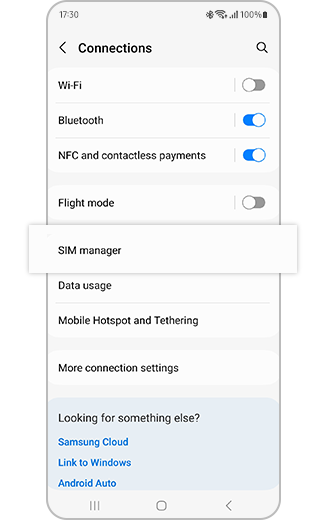
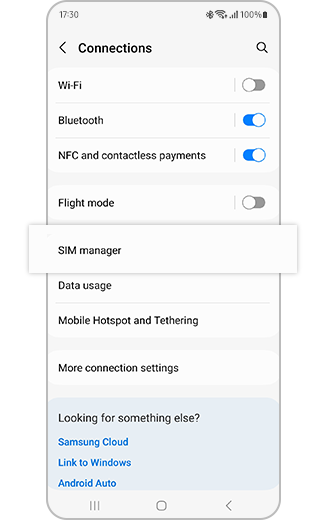
Step 1. Go to “Settings” > “Connections” > “SIM manager”.
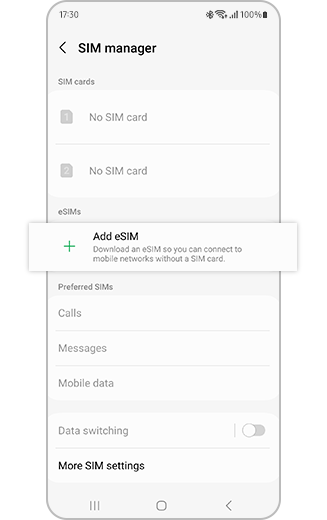
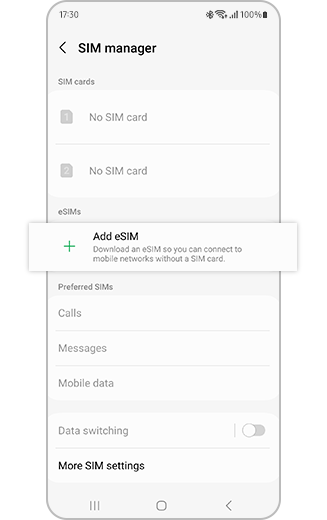
Step 2. Tap “Add eSIM” and your mobile plan will be automatically downloaded and activated on your eSIM.
Scan a QR code
You will need to contact your mobile provider to receive a QR code.
- Go to Settings > Connections > SIM manager
- Tap Add eSIM then Scan QR code from Service Provider
- Scan the QR code
- Your mobile plan will be automatically downloaded and activated on your eSIM
Enter information manually
Some mobile providers that support eSIM provide a code to manually add an eSIM.
- Go to Settings > Connections > SIM manager
- Tap Add eSIM, Scan QR code from Service Provider then Enter activation code
- Enter the information provided by your mobile provider
- Your mobile plan will be automatically downloaded and activated on your eSIM
Galaxy devices that support eSIM
- Galaxy S26 Ultra / S26+ / S26
- Galaxy Z Flip
- Galaxy Tab S11 / S11 Ultra, Galaxy Tab / S10+ / S10 Ultra, Galaxy Tab S9 / S9+ / S9 Ultra
- Galaxy Tab S10 FE / S10 FE+, Galaxy Tab S9 FE / S9 FE+
- Galaxy Tab Active5
Please note: Depending on the country of origin, eSIM may not be supported even if your device is listed above. Please check if your device supports this feature in your location.
Network carriers that may support eSIM
Africa
- Ghana: AirtelTigo, MTN, Vodafone
- Kenya: Airtel, Jamii Telecommunications, Safaricom
- Libya: Almadar Aljadid, Libyana
- Mauritius: Emtel, My.T
- Morocco: inwi, Maroc Telecom, Orange
- Nigeria: MTN, 9mobile
- Senegal: Expresso, Free, Orange
- South Africa: Cell C, MTN, Telkom, Vodacom
- Tunisia: Ooredoo, Orange
Asia-Pacific and Australia
- Australia: Optus, Telstra, Vodafone
- Bangladesh: Banglalink, Grameenphone, Robi
- Cambodia: Cellcard, Metfone, Smart Axiata
- Guam: Docomo Pacific, GTA, IT&E
- Hong Kong: csl., China Mobile HK, 3HK, SmarTone, Sun Mobile
- India: Airtel, Jio, Vodafone-Idea
- Indonesia: Indosat Ooredoo Hutch(IOH), Smartfren, XL Axiata
- Japan: NTT docomo, KDDI, Rakuten Mobile, SoftBank
- Kazakhstan: Beeline, Kcell, Tele2
- Korea: KT, LGU+, SKT
- Laos: Lao Telecom, TPLUS, Unitel
- Macau: CTM, China Telecom Macau
- Malaysia: Digi, Maxis, U Mobile, Yes 4G
- Maldives: Dhiraagu, Ooredoo
- Mongolia: Mobicom, Unitel
- Myanmar: ATOM, Mytel, Ooredoo
- Nepal: Ncell, Nepal Telecom
- New Zealand: 2degrees, One.NZ, Spark
- Pakistan: Jazz, Ufone, Zong
- Philippines: Dito, Globe, Smart
- Singapore: M1
- Sri Lanka: Dialog, Hutch, Mobitel
- Thailand: AIS, Dtac, TrueMove H
- Uzbekistan: Ucell, UMS, UzMobile
- Vietnam: MobiFone, Viettel Mobile, Vinaphone (VNPT)
Europe
- Albania: One Albania, Vodafone
- Armenia: Viva MTS, Ucom
- Austria: A1, Drei, HoT, Magenta Telekom, Spusu
- Azerbaijan: Azercell, Bakcell, Narmobile
- Belarus: MTS, A1
- Belgium: BASE, Orange, Proximus, Telenet
- Bosnia and Herzegovina: BH Telecom, HT Eronet, mtel
- Bulgaria: A1, Yettel, Vivacom
- Croatia: A1, Hrvatski Telekom, Telemach
- Cyprus: Cytamobile-Vodafone, epic
- Czechia: O2, T-Mobile, Vodafone
- Denmark: TDC, Telenor, NORYS, Tre
- Estonia: Elisa, Tele2, Telia
- Finland: DNA, Elisa, Telia
- France: Bouygues Telecom, Free Mobile, Orange, SFR
- Germany: 1&1, O2, Telekom, Vodafone
- Greece: COSMOTE, Vodafone, Nova
- Georgia: Cellfie, MagtiCom, Silknet
- Hungary: Magyar Telekom, Telenor, Vodafone
- Iceland: Nova, Siminn, Vodafone
- Ireland: Three, Vodafone
- Italy: CoopVoce, Fastweb, Ho.mobile, Iliad, Spusu, TIM, Vodafone, WINDTRE
- Kosovo: IPKO, VALA
- Latvia: Bite, LMT, Tele2
- Liechtenstein: Salt FL, Swisscom FL, Telecom Liechtenstein
- Lithuania: Bitė, TELE2, Telia
- Luxembourg: Orange, POST, Tango
- Malta: Epic, GO Malta, Melita
- Moldova: Moldcell, Orange
- Montenegro: mtel, Telekom, Telenor
- Netherlands: KPN, Odido, Vodafone
- North Macedonia: A1, Telekom
- Norway: Ice, Mycall, Onecall, Telenor, Telia
- Poland: Orange, Play, Plus, T-Mobile, Truphone
- Portugal: MEO, NOS, Vodafone
- Romania: Orange, Telekom, Vodafone
- Russia: Beeline, MegaFon, MTS, SberMobile, Tele2, Tinkoff
- Serbia: A1, Globaltel, mts, Yettel
- Slovakia: 4KA, O2, Orange, Telekom
- Slovenia: A1, T-2, Telekom Slovenije, Telemach
- Spain: Movistar, MasOrange, Vodafone, Yoigo
- Sweden: Halebop, Tele2, Telenor, Telia, Tre
- Switzerland: Salt, Sunrise, Swisscom
- Ukraine: Lifecell, Kyivstar, TriMob, Vodafone
- UK: EE, O2, Spusu UK, Three, Truphone, Vodafone
Central and South America
- Argentina: Claro, Movistar, Personal
- Bolivia: Entel, Tigo, Viva
- Brazil: Claro, TIM, Vivo
- Chile: Entel, Movistar, WOM
- Colombia: Claro, Movistar, Tigo, WOM
- Costa Rica: Claro
- Dominican Republic: Altice GSM, Claro
- Ecuador: Claro, Movistar
- El Salvador: Claro, Movistar, Tigo
- Guatemala: Claro, Tigo
- Honduras: Claro, Tigo
- Jamaica: Digicel, FLOW Jamaica
- Mexico: AT&T Mexico, Movistar, Telcel
- Nicaragua: Claro, Tigo
- Panama: Cable & Wireless
- Paraguay: Claro, Personal, Tigo
- Peru: Claro, Entel, Movistar
- Puerto Rico & United States Virgin Islands: Claro, Liberty
- Uruguay: Claro, Movistar
Middle East
- Bahrain: Batelco, stc, Zain
- Iraq: Fastlink
- Israel: Cellcom, Hot Mobile, Partner, Pelephone
- Jordan: Orange Jordan, Umniah, Zain Jordan
- Kuwait: Ooredoo, stc, Virgin Mobile, Zain
- Lebanon: Alfa
- Oman: Omantel, Ooredoo, Vodafone
- Palestine: Jawwal
- Qatar: Ooredoo, Vodafone
- Saudi Arabia: Mobily, stc, Zain
- Turkey: Türk Telekom, Turkcell, Vodafone
- UAE: du, Etisalat, Virgin Mobile
North America
- USA: Appalachian Wireless, AT&T, Boost Mobile, Carolina West Wireless, Cellcom, Consumer Cellular, Cricket, C-Spire, FirstNet, GCI, Google Fi, H2O Wireless, Metro by T-Mobile, Mint Mobile, Nemont, Nex-Tech Wireless, Optimum Mobile, PureTalk, Spectrum Mobile, Strata, Thumb Cellular, T-Mobile, Tracfone, Truphone, Union Wireless, United Wireless, US Cellular, US Mobile, Verizon, Viaero, Visible, Xfinity Mobile
- Canada: Bell, Eastlink, Fido, Freedom, Koodo Mobile, Lucky Mobile, Rogers, SaskTel, Telus, Virgin Plus
Please note: Samsung makes no representations concerning and is not responsible for the performance, selection, use, accuracy or reliability of third parties’ websites, services or products. Information concerning products not manufactured by Samsung and the third parties’ websites not owned or managed by Samsung are provided without any recommendations or endorsements by Samsung. For details, contact the respective carrier.
If the above information does not match what your product is showing, you may check the User Manual for your product. If you are unable to solve the problem, please contact us for further assistance.
Thank you for your feedback!
Please answer all questions.
RC01_Static Content : This text is only displayed on the editor page